
Most AI image generators give you a pretty picture and nothing else. You export a PNG, open Illustrator, spend 40 minutes manually tracing, and wonder why you even bothered. Recraft.ai was built to solve exactly that problem.
This Recraft.ai review covers what the platform does differently, what it quietly excels at that no one talks about, where it genuinely falls short, and whether the pricing makes sense for your situation in 2026.
What Is Recraft.ai – And Why Designers Are Actually Paying Attention
Recraft launched in 2022 and has since grown to over 3 million users. It’s used in-house by design teams at Netflix, HubSpot, Airbus, and Asana – names that don’t adopt creative tools casually.
What sets it apart is its core promise: production-ready design assets, not just aesthetic images.
Where most AI tools output raster files that require cleanup, Recraft generates true SVG vectors, 3D graphics, digital illustrations, icon sets, and product mockups — all inside a single browser-based workspace.
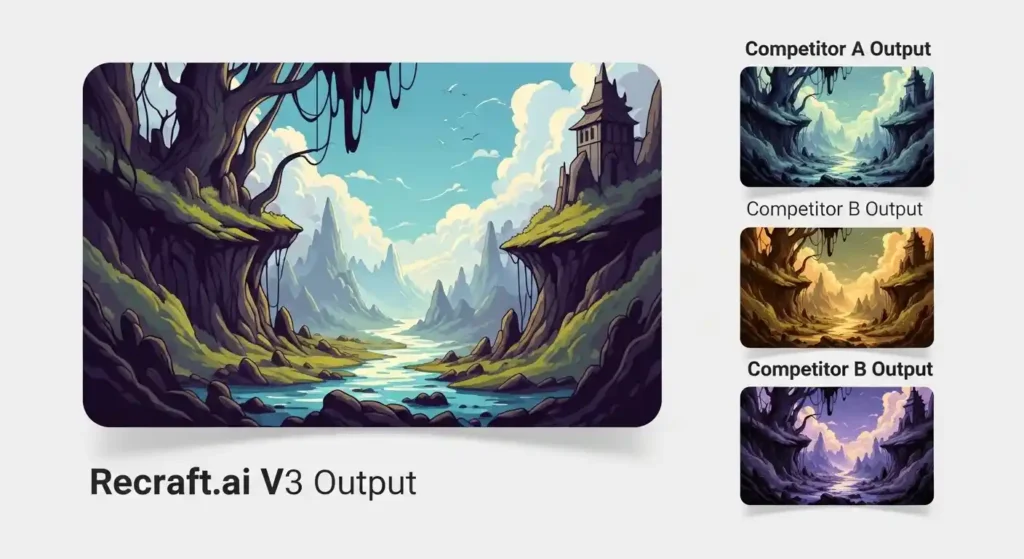
Its proprietary V3 model ranked an ELO score of 1172 on Hugging Face’s Text-to-Image Benchmark, placing it among the top-performing AI models globally. That’s not marketing fluff — independent reviewers have validated the benchmark results.
Think of it less like Midjourney and more like a junior design team that never sleeps.
The Hidden Pros Nobody Talks About
This is where most Recraft.ai reviews stop at the obvious – “it makes vectors, cool.” But there are a few capabilities that quietly make it exceptional for professional workflows.
Brand Style Lock-In
This is the sleeper feature. Recraft lets you define a custom “brand style” by uploading reference images, setting color palettes, and locking line weights. Every generation you run after that respects that visual language.
For agencies managing multiple clients, this is massive. You’re not re-prompting from scratch every time.
You’re generating within a pre-approved design system. That’s not something Midjourney, DALL·E, or even Adobe Firefly do cleanly out of the box.
Text-in-Image That Actually Works
Text rendering has been the Achilles’ heel of AI image generation for years. Recraft V3 has made serious strides here.
Typography integration is clean enough for marketing materials, social headers, and even some print applications.
It won’t replace a professional typographer for a book cover, but for digital assets? It holds up.
True SVG Vector Output
You get real, scalable vector files — not a rasterized image dressed up with an SVG wrapper.
For logo ideation, icon design, and any asset that needs to scale from a phone screen to a billboard, this changes everything. It eliminates the entire “trace in Illustrator” step that designers quietly dread.
One Canvas, Everything
The workspace consolidates text-to-image, image editing, background removal, upscaling, mockup creation, and style management in a single interface.
No app-switching, no format juggling. For freelancers who live inside too many tools, this friction reduction is genuinely underrated.
Also Read: Top Graphic Designers Tools Every Creative Needs in 2026
Recraft.ai Pricing: What You Actually Get
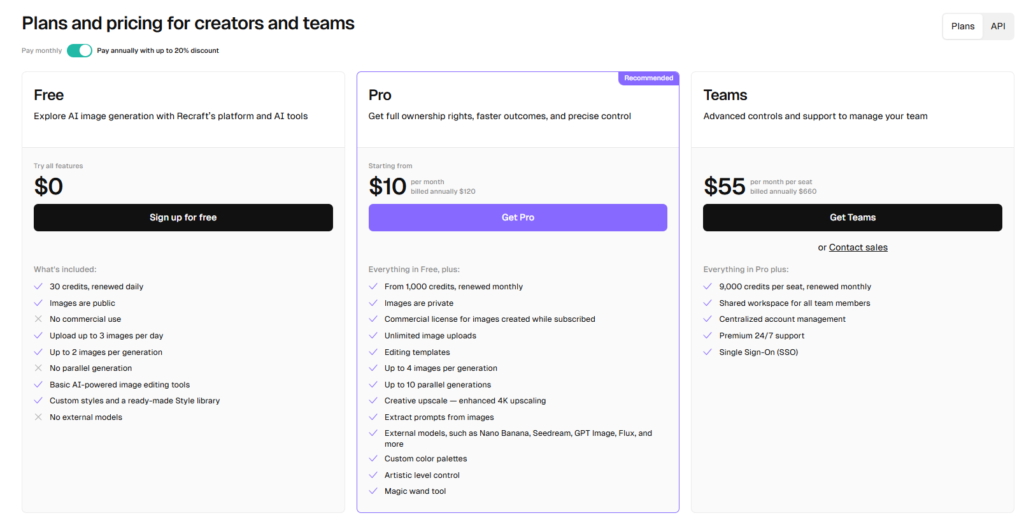
Recraft runs on a credit-based model. Here’s what the plans look like in 2026:
Free Plan – 30 daily credits that refresh each day. Enough to explore the platform seriously. The catch: all images go public in the community gallery, and you get zero commercial licensing. If you’re doing client work, this plan doesn’t work.
Pro Plan — Starts at $10/month (billed annually) or $20/month. Unlocks private generation, full commercial rights, unlimited image uploads, and access to all editing tools. You can also top up with credit packs of 400 credits for $4 — those never expire, which is useful for unpredictable workloads.
Teams Plan — Built for agencies and in-house creative departments. Shared credit pools, collaborative workspaces, premium support, and SSO for enterprise security. Pricing scales with team size.
The credit system is a double-edged sword. It gives flexibility, but monthly credits don’t roll over — unused credits expire at renewal. That stings during slow months.
Also Rad: 10 Best AI Logo Design Tools: Trusted by 10k+ Businesses (Free & Paid)
What Recraft.ai Gets Wrong
Recraft isn’t perfect, and any review that skips the cons is selling you something.
Dimension inconsistency. Users consistently report that image dimensions can drift after generation, even when you’ve set explicit width and height parameters. For teams working to strict grid specs, this requires manual checking — not ideal.
Mobile is a rough experience. The canvas was clearly designed for large monitors. On tablets or smaller laptops, the interface feels cramped, tools misbehave, and the lasso selection can accidentally refresh your session. Recraft is a desktop-first tool, full stop.
Reliability under load. The V3 model is technically impressive, but the gap between its benchmark performance and consistent day-to-day output can be noticeable. Some users report warping artifacts, particularly around human figures, that require regenerating rather than editing.
Learning curve that rewards insiders. Getting great results from Recraft requires learning its prompt style, style editor, and credit logic. It’s not plug-and-play. First-timers often underperform the platform’s actual capability for their first few weeks.
Who Should Use Recraft.ai in 2026?
Recraft is a strong fit if you’re a freelance illustrator or graphic designer producing brand assets at volume, a marketing team that needs social graphics and product visuals to stay on-brand, a startup building a visual identity who can’t afford a full design retainer, or a design agency that wants to speed up ideation rounds with clients before committing to production.
It’s probably not the right primary tool if you need photorealistic imagery (consider Midjourney or Stable Diffusion), if your work is heavily mobile-based, or if you need absolute dimension precision on every export without checking manually.
Checkout the Recraft.ai official pricing page
Recraft.ai vs. The Competition
Compared to Midjourney, Recraft wins on structured design output, vector support, and brand consistency – but Midjourney still produces more visually striking, emotionally resonant imagery. They’re not really competing for the same use case.
Compared to Adobe Firefly, Recraft is considerably more powerful for standalone generation and vector workflows, but Firefly integrates natively with Photoshop and Illustrator. If you’re already Adobe-native, that integration value is hard to ignore.
Compared to Canva’s AI tools, Recraft is significantly more capable for professional design work, though Canva is simpler for non-designers who just need social graphics fast.
Final Verdict: Is Recraft.ai Worth It in 2026?
Yes — with the right expectations. Recraft.ai is one of the most legitimate tools for designers who want AI to speed up their professional workflow without sacrificing output quality.
The vector generation alone is a genuine competitive advantage. The brand style system is something teams should be paying more attention to than they are.
The credit model can be frustrating, mobile support needs work, and the learning curve is real.
But for any designer or creative team producing visual assets regularly, the Pro plan at $10–$20/month is a straightforward value proposition.
Start with the free plan. Give yourself a week to understand the style system. By day five, you’ll know whether it belongs in your stack.
Have questions about Recraft.ai or want to compare it to a specific tool? Drop a comment below or check out our full comparison of AI design tools for 2026.






Leave a Comment